

WebDAV support in SFTPPlus MFT
SFTPPlus operates as both a WebDAV server and a WebDAV client over HTTPS. Expose files to standard WebDAV clients, or automate transfers to remote WebDAV servers and SharePoint On-Premise document libraries.
- Updated
- 2026-10-15
SFTPPlus WebDAV support
SFTPPlus MFT supports WebDAV in both roles.
As a WebDAV server, external users and applications can access files over HTTPS.
As a WebDAV client, SFTPPlus can automatically exchange files with remote WebDAV servers.
WebDAV (Web Distributed Authoring and Versioning) is a set of extensions to the Hypertext Transfer Protocol (HTTP) focused on file management. The standard extends HTTP with methods such as PROPFIND, MKCOL, PROPPATCH, COPY and MOVE, which allow clients to list directories, create folders, and copy, move or delete files directly on a remote server.
Because WebDAV runs over HTTP and HTTPS, it can share a published HTTP or HTTPS endpoint with ordinary web traffic; when HTTPS is exposed on the conventional port, only port 443 needs to be published. This makes it a practical alternative to SFTP or FTPS for users and applications that need to work with remote files without installing a dedicated file transfer client.
SFTPPlus as a WebDAV server
SFTPPlus can expose files over WebDAV so that external clients can browse directories, download files, upload new files, and create or remove folders.
The WebDAV interface is served by the standard SFTPPlus HTTP or HTTPS service. The same HTTPS service simultaneously serves the browser-based web client, the REST API, AS2 and WebDAV, so there is no need to set up and maintain a separate HTTPS server for each file transfer type. One service, one TLS certificate and one published port cover all of them.
The SFTPPlus server supports WebDAV Class 1, including the PROPFIND, MOVE, and COPY methods used by standard WebDAV clients to discover and manage remote content.
The server-side WebDAV support provides:
- Standard file operations: authorized clients can list directories, download and upload files, and create, rename or delete folders and files.
- Per-user access control: each account can be granted access to a different set of directories, with its own read, write and delete permissions. WebDAV users are the same accounts used for every other protocol, so there is no separate WebDAV user database to maintain.
- Encrypted transfers: when HTTPS is enabled, TLS keeps credentials and file content confidential in transit.
- Shared authentication: WebDAV accounts can be validated against the same sources used by the rest of SFTPPlus, including operating system accounts, LDAP and Active Directory.
- Centralized management: WebDAV services, accounts, permissions and file policies are configured from the same SFTPPlus web-based administration interface used for all other protocols.
- Complete audit trail: every action performed by a WebDAV client is recorded, together with the security level negotiated for the connection.
Because WebDAV accounts are ordinary SFTPPlus accounts, the same file can be published over WebDAV to one partner and over SFTP to another, without duplicating the data or the account configuration.
SFTPPlus as a WebDAV client
SFTPPlus can also act as a WebDAV client, connecting to remote WebDAV servers to automate file transfers. This is useful for integrating with external systems and document management platforms that expose WebDAV as their file exchange interface.
The client-side WebDAV support provides:
- Automated downloads: SFTPPlus connects to a remote WebDAV server on a schedule and retrieves new files, which is useful for collecting data from external sources or synchronizing content.
- Automated uploads: files can be pushed to a remote WebDAV server, for distributing documents to partners or archiving data.
- Workflow integration: WebDAV transfers can be combined with the rest of the SFTPPlus automation features, such as file processing, virus scanning, event handlers and notifications.
Connection security
WebDAV client connections use HTTPS by default. The TLS version and the accepted cipher list are configurable, and the recommended default follows the Mozilla intermediate profile, which uses TLS 1.2 and TLS 1.3. Plain, unencrypted HTTP can be explicitly enabled for testing or for troubleshooting against a legacy server, but it is strongly discouraged in production.
Authentication
Remote WebDAV servers are accessed with username and password credentials using standard HTTP Basic authentication, as defined in RFC 7617.
WebDAV and SharePoint
WebDAV is the protocol used to reach SharePoint On-Premise (self-hosted) document libraries. SFTPPlus connects to those libraries as a WebDAV client, which lets you automate the exchange of documents with an on-premise SharePoint farm without deploying an agent on the SharePoint servers.
For SharePoint Online, SFTPPlus provides a dedicated integration built on the Microsoft Graph API rather than WebDAV. See the SharePoint page for details on both deployment models.
WebDAV as a file transfer bridge
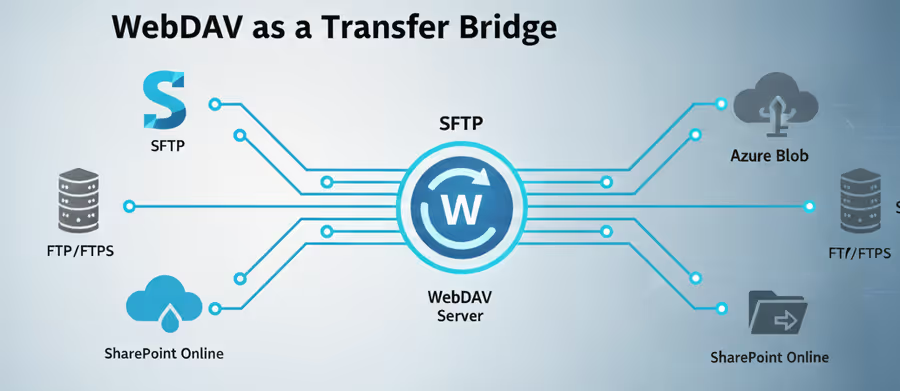
WebDAV in SFTPPlus is not an isolated feature. A WebDAV endpoint can be used as the source or the destination of any SFTPPlus transfer, which turns SFTPPlus into a bridge between WebDAV and the other supported protocols and storage systems:
- SFTP and SCP servers
- FTP and FTPS servers
- HTTP and HTTPS servers
- Azure Blob and Azure File storage
- Windows shares (SMB)
- SharePoint Online and On-Premise
- AS2 trading partners
- Email attachments
For example, a workflow can automatically download files from an Azure Blob container and upload them to a remote WebDAV server, or collect documents from a SharePoint On-Premise library over WebDAV and deliver them to a partner's SFTP server. The reverse is equally possible: files uploaded by a partner over SFTP can be published into a WebDAV document store.
This removes the need for custom scripts or manual intervention for each transfer path, and it makes WebDAV a practical migration route when moving away from ageing document management systems.
Get in touch with our experts
Ready to automate your file transfers with WebDAV? The SFTPPlus team is here to help you get started. Whether you need assistance configuring SFTPPlus as a WebDAV server, connecting it as a client to a SharePoint On-Premise library, or integrating WebDAV into your existing workflows, our support team can provide the guidance you need.
Contact us to learn how to implement and optimize secure and automated WebDAV transfers for your organization.