

Events and Activity Log
SFTPPlus MFT records all system and file transfer activity through its event and activity log functionality. Every action performed by transfer components or administrative tools generates an event, creating a complete and traceable record of platform activity.
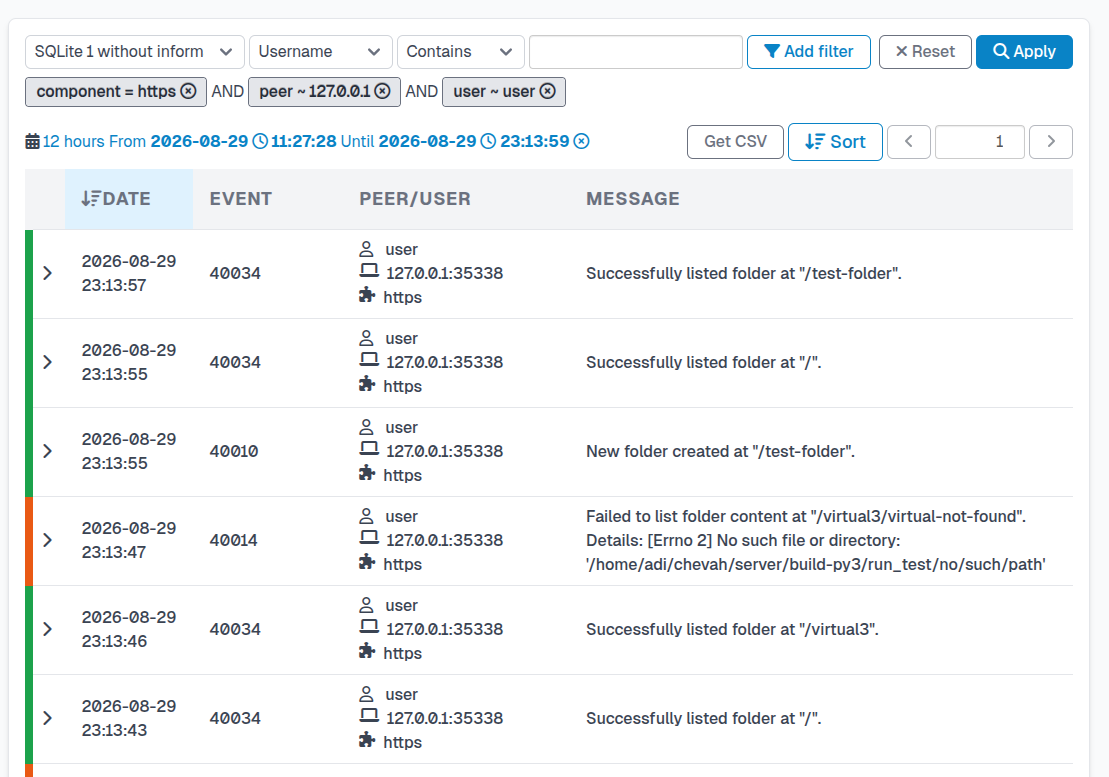
Event Generation
In SFTPPlus, any action, whether performed by an end user, an automated transfer, or an administrator, produces an event. Each event contains detailed information that can be used both to trigger automated responses and to maintain a full audit trail.
Events include actions such as:
- File uploads, downloads, and deletions
- Connection attempts and authentication operations
- Configuration updates and administrative changes
This event-based approach provides the foundation for both operational monitoring and compliance auditing.
Activity Log
The activity log is the central record of all events generated by SFTPPlus. It allows administrators to review and analyze every operation across the system, from the creation of a file to its final download or removal.
Each log entry contains:
- The user or process that triggered the action
- The source IP address and port
- The time and date of the event
- The SFTPPlus component responsible for the action
- The event group (such as transfer, admin, or authentication)
- Additional metadata describing the operation in structured format
The activity log is a key tool for auditing file transfers and troubleshooting errors, helping administrators trace any issue through the complete sequence of related actions.
Log Viewing and Management
SFTPPlus provides an embedded web management interface that includes tools to view, search, and filter the activity log. This interface allows administrators to quickly locate specific events and analyze transfer activity in real time.
Activity data can also be written to multiple local text or CSV log files. Each file can have its own event filters, entry format, storage path, rotation schedule, and retention limit. See the audit log file solution for examples of complete logs, critical error logs, and transfer reports.
Integration with External Systems
SFTPPlus can send log data to external monitoring or security platforms for centralized analysis. Supported systems include:
- Syslog servers
- SIEM tools such as Splunk, Elastic (ELK), Graylog, Datadog, and LogRhythm
- HTTP API custom HTTP based micro-services
This allows integration with existing organizational monitoring and compliance infrastructure.