'%20d='M0%200h1200v600H0z'/%3e%3cg%20transform='translate(96%2060)%20scale(.84)'%3e%3cg%20fill='none'%20stroke='%23769bcd'%20stroke-opacity='.09'%3e%3cpath%20d='m-100%20370%20600-300%20800%20400M-100%20450%20600%20100l800%20400M-100%20530%20600%20180l800%20400M-100%20610%20600%20260l800%20400'/%3e%3cpath%20d='m100%20600%20900-450M260%20600l820-410M420%20600l820-410M580%20600l820-410'/%3e%3c/g%3e%3cpath%20d='m360%20398%20245-122%20234%20117-245%20122z'%20fill='%23050e23'%20opacity='.65'/%3e%3cg%20fill='none'%20stroke-linecap='round'%20stroke-linejoin='round'%3e%3cpath%20d='m145%20425%20420-210m-320%20285%20320-160'%20stroke='%237790b5'%20stroke-width='4'%20stroke-dasharray='9%2014'%20opacity='.5'/%3e%3cpath%20d='m166%20330%20200%20100%20560-280'%20stroke='%2375dcd4'%20stroke-opacity='.1'%20stroke-width='30'/%3e%3cpath%20d='m166%20330%20200%20100%20560-280'%20stroke='url(%23path)'%20stroke-width='7'/%3e%3c/g%3e%3cg%20stroke-linejoin='round'%3e%3cpath%20d='m510%20174%2070-35%20150%2075-70%2035z'%20fill='%23689bd0'%20stroke='%2398cef3'%20stroke-width='2'/%3e%3cpath%20d='M660%20249v230l70-35V214z'%20fill='%2322436b'%20stroke='%235895c2'%20stroke-width='2'/%3e%3cpath%20d='M510%20174v230l150%2075V249z'%20fill='url(%23gateway)'%20stroke='%2398cef3'%20stroke-width='2'/%3e%3cpath%20d='m533%20212%20104%2052v165l-104-52z'%20fill='%23142c4b'%20stroke='%2383b5df'%20stroke-width='2'/%3e%3cpath%20d='m552%20243%2044%2022%2022%2033v58l-66-33z'%20fill='%23c1e0f3'/%3e%3cpath%20d='m596%20265%200%2022%2022%2011'%20fill='%23659bc4'/%3e%3cpath%20d='m565%20290%2026%2013m-26%200%2017%209'%20stroke='%23426a92'%20stroke-width='4'/%3e%3cellipse%20cx='592'%20cy='342'%20rx='17'%20ry='21'%20transform='rotate(-26%20592%20342)'%20fill='%2379e0c8'/%3e%3cpath%20d='m584%20341%206%209%2012-13'%20fill='none'%20stroke='%2312374b'%20stroke-width='4'%20stroke-linecap='round'/%3e%3cpath%20d='m554%20370%2063%2031'%20stroke='%237be5cc'%20stroke-width='4'/%3e%3c/g%3e%3cg%20fill='%23a6bad7'%20stroke='%23152540'%20stroke-width='4'%3e%3ccircle%20cx='484'%20cy='256'%20r='11'/%3e%3ccircle%20cx='484'%20cy='380'%20r='11'/%3e%3c/g%3e%3cg%20transform='translate(855%2082)'%3e%3cpath%20d='M-32%20109c-36%200-48-45-22-65%2010-8%2022-10%2033-6C-17-6%2039-21%2066%2013c26-13%2059%206%2059%2036%2043-1%2049%2060%208%2060z'%20fill='%23284f75'%20stroke='%239edbf1'%20stroke-width='3'/%3e%3cpath%20d='m19%2055%2026%2013%2026-13v27L45%2095%2019%2082z'%20fill='%238ee8d3'/%3e%3cpath%20d='m19%2055%2026-13%2026%2013-26%2013z'%20fill='%23c4f7e9'/%3e%3cpath%20d='M45%2068v27'%20stroke='%23396c80'%20stroke-width='2'/%3e%3c/g%3e%3cg%20transform='translate(166%20303)'%20fill='%23223c63'%20stroke='%2390b7e7'%20stroke-width='2'%20stroke-linejoin='round'%3e%3cpath%20d='m-38-19%2038-19%2038%2019v48L0%2048l-38-19z'/%3e%3cpath%20d='M-38-19%200%200l38-19M0%200v48'%20fill='none'/%3e%3cpath%20d='m-27-2%2016%208m-16%207%2016%208'%20stroke='%238de7d3'%20stroke-width='4'/%3e%3c/g%3e%3c/g%3e%3c/svg%3e)
Use Entra ID tenant restrictions through a corporate proxy
Configure SFTPPlus MFT to trust your corporate proxy's certificates when using Microsoft Entra ID with tenant restrictions v2.
Continue reading


This is a subset of our news articles, filtered by tag.
Configure SFTPPlus MFT to trust your corporate proxy's certificates when using Microsoft Entra ID with tenant restrictions v2.

Troubleshoot SharePoint Online login failures and migrate transfers from a WebDAV user login to an OAuth2 application identity using Microsoft Graph.
'%20d='M0%200h800v400H0z'%20/%3e%3ccircle%20cx='400'%20cy='200'%20r='190'%20fill='%234faac9'%20opacity='0.04'%20/%3e%3cg%20fill='none'%20stroke-width='2'%3e%3cellipse%20cx='400'%20cy='200'%20rx='170'%20ry='70'%20stroke='%2398d5e7'%20/%3e%3cellipse%20cx='400'%20cy='200'%20rx='156'%20ry='70'%20transform='rotate(52%20400%20200)'%20stroke='%238b9fcc'%20/%3e%3cellipse%20cx='400'%20cy='200'%20rx='156'%20ry='70'%20transform='rotate(-52%20400%20200)'%20stroke='%236cabce'%20/%3e%3c/g%3e%3ccircle%20cx='400'%20cy='200'%20r='74'%20fill='%23142b45'%20stroke='%23496e8f'%20/%3e%3cpath%20d='M365%20144h46l27%2027v76a9%209%200%200%201-9%209h-64a9%209%200%200%201-9-9v-94a9%209%200%200%201%209-9Z'%20fill='url(%23file)'%20/%3e%3cpath%20d='M411%20144v27h27'%20fill='%236eabc4'%20/%3e%3cg%20fill='none'%20stroke='%23315d79'%20stroke-width='5'%20stroke-linecap='round'%20stroke-linejoin='round'%3e%3cpath%20d='M374%20193h46M374%20208h30M374%20234h41m-9-8%209%208-9%208'%20/%3e%3c/g%3e%3cg%20transform='translate(304%2093)'%3e%3ccircle%20r='26'%20fill='%23132640'%20stroke='%23a9b8e3'%20stroke-width='2'%20/%3e%3cg%20fill='none'%20stroke='%23d2dcff'%20stroke-width='3'%20stroke-linecap='round'%20stroke-linejoin='round'%3e%3ccircle%20cx='-7'%20cy='-3'%20r='7'%20/%3e%3cpath%20d='m-1%202%2013%2013m-6-6%205-5m-1%209%205-5'%20/%3e%3c/g%3e%3c/g%3e%3cg%20transform='translate(570%20200)'%3e%3ccircle%20r='26'%20fill='%23142e46'%20stroke='%2398d5e7'%20stroke-width='2'%20/%3e%3crect%20x='-11'%20y='-2'%20width='22'%20height='19'%20rx='3'%20fill='none'%20stroke='%23c6f0fa'%20stroke-width='3'%20/%3e%3cpath%20d='M-7-2v-8a7%207%200%200%201%2014%200v8M0%205v5'%20fill='none'%20stroke='%23c6f0fa'%20stroke-width='3'%20stroke-linecap='round'%20/%3e%3c/g%3e%3cg%20transform='translate(304%20307)'%3e%3ccircle%20r='26'%20fill='%23132c44'%20stroke='%2383bed9'%20stroke-width='2'%20/%3e%3crect%20x='-11'%20y='-14'%20width='22'%20height='28'%20rx='3'%20fill='none'%20stroke='%23b8e0f2'%20stroke-width='3'%20/%3e%3cpath%20d='M-5-7H5M-5%200H5M-5%207H1'%20stroke='%23b8e0f2'%20stroke-width='3'%20stroke-linecap='round'%20/%3e%3c/g%3e%3c/svg%3e)
Use encrypted transfers, access controls, and audit logs as part of your organization's approach to SOC 2, with file storage under your control.

Manage authentication, file access, account expiration, password age, inactive users, home-folder cleanup, and login reporting from SFTPPlus MFT.

Bind partner accounts and groups to their expected source networks, adding identity-aware access control beyond a network firewall.
'%20/%3e%3crect%20width='900'%20height='300'%20fill='url(%23grid)'%20/%3e%3ccircle%20cx='170'%20cy='150'%20r='122'%20fill='%231c7894'%20opacity='0.09'%20/%3e%3ccircle%20cx='746'%20cy='149'%20r='126'%20fill='%2357d0d4'%20opacity='0.08'%20/%3e%3cg%20fill='none'%20stroke-linecap='round'%3e%3cpath%20d='M96%2078%20C210%2078%20282%20104%20368%20126'%20stroke='%2378def0'%20stroke-width='5'%20/%3e%3cpath%20d='M96%20150%20H358'%20stroke='%23ffbf69'%20stroke-width='5'%20stroke-dasharray='13%2012'%20/%3e%3cpath%20d='M96%20222%20C210%20222%20282%20196%20368%20174'%20stroke='%2378def0'%20stroke-width='5'%20/%3e%3cpath%20d='M518%20150%20H674'%20stroke='%237de2c2'%20stroke-width='7'%20/%3e%3c/g%3e%3cg%20filter='url(%23shadow)'%3e%3ccircle%20cx='92'%20cy='78'%20r='23'%20fill='%23e9f9ff'%20/%3e%3ccircle%20cx='92'%20cy='78'%20r='10'%20fill='%2320a9c9'%20/%3e%3ccircle%20cx='92'%20cy='150'%20r='23'%20fill='%23ffe3bb'%20/%3e%3ccircle%20cx='92'%20cy='150'%20r='10'%20fill='%23f68b3c'%20/%3e%3ccircle%20cx='92'%20cy='222'%20r='23'%20fill='%23e9f9ff'%20/%3e%3ccircle%20cx='92'%20cy='222'%20r='10'%20fill='%2320a9c9'%20/%3e%3c/g%3e%3cg%20transform='translate(252%20121)'%20filter='url(%23shadow)'%3e%3ccircle%20cx='29'%20cy='29'%20r='29'%20fill='%23c83e51'%20/%3e%3cpath%20d='M17%2017%2041%2041M41%2017%2017%2041'%20fill='none'%20stroke='%23fff'%20stroke-width='7'%20stroke-linecap='round'%20/%3e%3c/g%3e%3cg%20transform='translate(356%2038)'%20filter='url(%23shadow)'%3e%3cpath%20d='M94%208c38%2028%2074%2030%2074%2030v66c0%2065-43%20104-74%20118-31-14-74-53-74-118V38s36-2%2074-30Z'%20fill='url(%23shield)'%20stroke='%23c9fbff'%20stroke-width='5'%20stroke-linejoin='round'%20/%3e%3cpath%20d='M52%2079h84M52%20108h84M52%20137h84'%20stroke='%23073354'%20stroke-width='13'%20stroke-linecap='round'%20/%3e%3c/g%3e%3cg%20transform='translate(676%2073)'%20filter='url(%23shadow)'%3e%3crect%20width='122'%20height='154'%20rx='17'%20fill='url(%23server)'%20stroke='%23eaf9ff'%20stroke-width='4'%20/%3e%3crect%20x='17'%20y='20'%20width='88'%20height='31'%20rx='8'%20fill='%23174a6b'%20/%3e%3crect%20x='17'%20y='62'%20width='88'%20height='31'%20rx='8'%20fill='%23174a6b'%20/%3e%3crect%20x='17'%20y='104'%20width='88'%20height='31'%20rx='8'%20fill='%23174a6b'%20/%3e%3ccircle%20cx='88'%20cy='35.5'%20r='5.5'%20fill='%2373e2c0'%20/%3e%3ccircle%20cx='88'%20cy='77.5'%20r='5.5'%20fill='%2373e2c0'%20/%3e%3ccircle%20cx='88'%20cy='119.5'%20r='5.5'%20fill='%2373e2c0'%20/%3e%3cpath%20d='M31%2035.5h34M31%2077.5h34M31%20119.5h34'%20stroke='%238acade'%20stroke-width='5'%20stroke-linecap='round'%20/%3e%3c/g%3e%3cg%20transform='translate(600%2041)'%20opacity='0.9'%3e%3ccircle%20cx='28'%20cy='28'%20r='24'%20fill='%230a2a49'%20stroke='%2382e8e3'%20stroke-width='4'%20/%3e%3cpath%20d='M28%2014v14l10%207'%20fill='none'%20stroke='%23fff'%20stroke-width='5'%20stroke-linecap='round'%20stroke-linejoin='round'%20/%3e%3c/g%3e%3c/svg%3e)
Protect file transfer services with explicit source IP rules and automatic temporary blocks for repeated failed authentication attempts.
Review the modern protocols, ciphers, and OpenSSL support used by SFTPPlus MFT to protect file transfers.
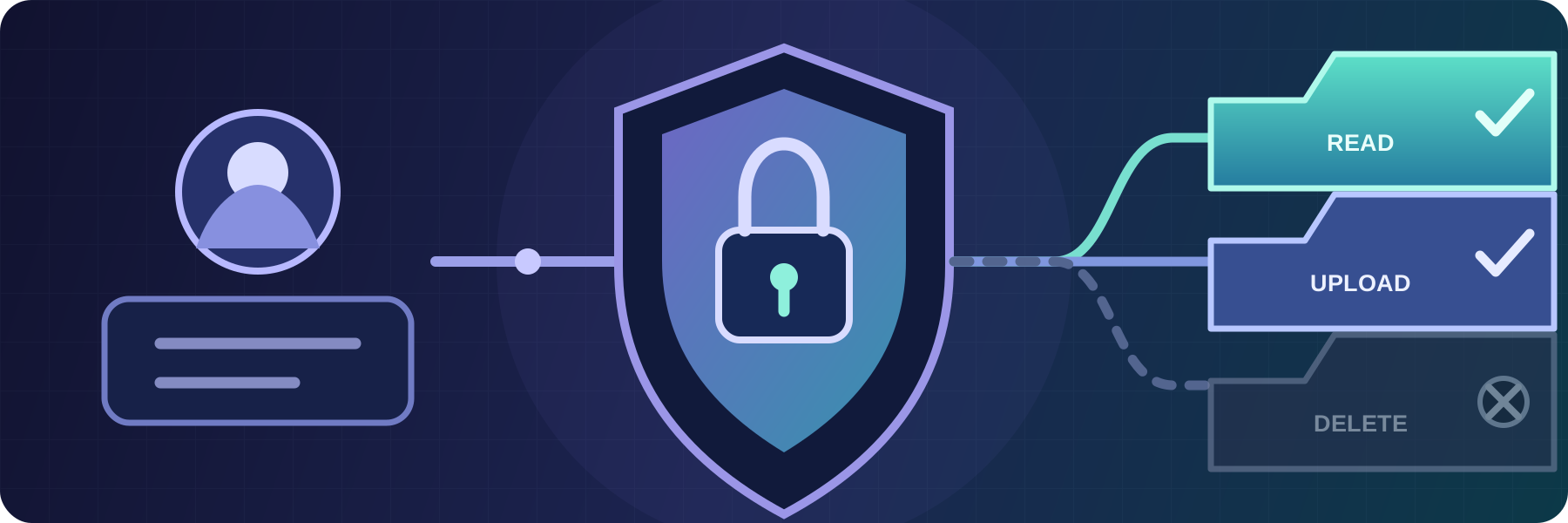
Combine user and group permissions, path matching, operating system access, and source network rules in one file transfer authorization policy.

SFTPPlus is not vulnerable to the recent SSH / SFTP Terrapin attack.

SFTPPlus is not using the OpenSSL 3.0.x libraries yet and is not affected by security vulnerabilities specific to these versions.