

Manage the complete user lifecycle
Manage authentication, file access, account expiration, password age, inactive users, home-folder cleanup, and login reporting from SFTPPlus MFT.

- Updated
- 2026-08-26
A file transfer account is more than a username and password. It has an owner, an access scope, an active period, and data that eventually needs to be reviewed or removed.
SFTPPlus MFT supports this complete lifecycle, from creating an account and granting access to identifying unused accounts and removing expired account data. The controls are available for accounts managed in SFTPPlus, while external identity providers can be used when identity is managed elsewhere.
Manage identity and file access together
Authentication determines whether SFTPPlus accepts a user's identity. Authorization determines which services, folders, and file operations that user can access.
SFTPPlus can manage application accounts directly or authenticate users through the operating system, Active Directory, LDAP, RADIUS, OpenID Connect providers, or a custom HTTP API. After authentication, account and group settings define home folders, virtual folders, source IP restrictions, and permissions such as reading, writing, or deleting files.
This separation lets an organization use its existing identity system while applying consistent file access rules in SFTPPlus. See the overview of user management in SFTPPlus and the detailed authentication and authorization documentation.
End access at a planned time
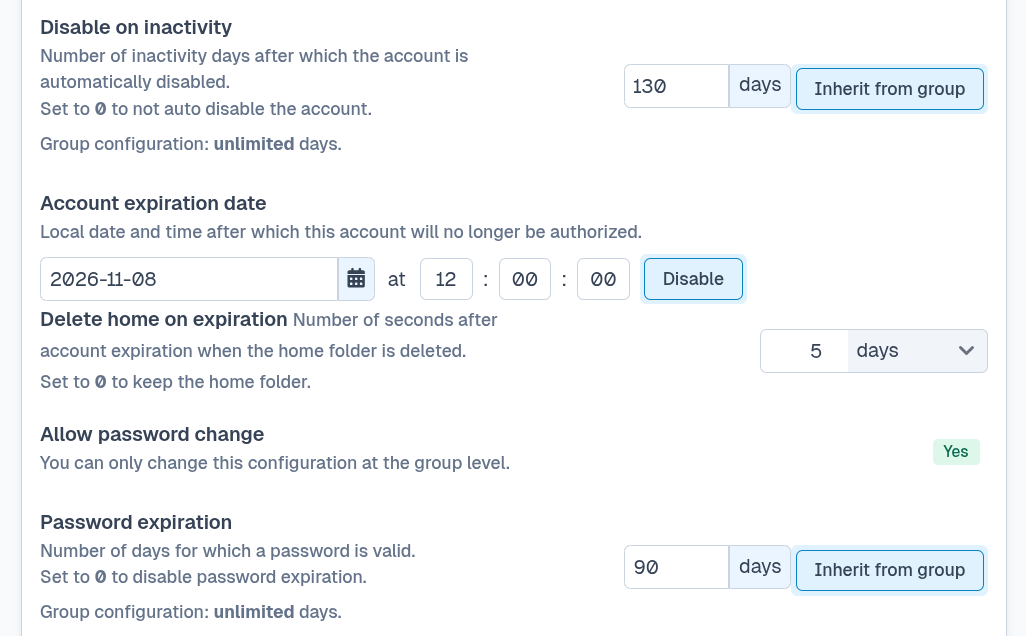
Temporary staff, suppliers, and project partners often need access for a known period. An administrator can set an expiration date and time for an account, after which SFTPPlus no longer authorizes it.
This avoids relying on someone to remember to disable access when a contract, project, or data exchange ends. The expiration can include a time zone, making the cutoff explicit for organizations operating across regions.
Remove expired home folders after a grace period
Disabling access does not always complete the account lifecycle. Files left in an expired user's home folder can consume storage or remain available longer than the organization's retention policy allows.
For application accounts managed in SFTPPlus, version 5.25.0 adds automatic home-folder cleanup. An administrator can configure how long SFTPPlus waits after the account expires before deleting its home folder. This grace period provides time to review, archive, or recover files before removal.
After an eligible home folder is deleted, SFTPPlus also disables the account. Automatic deletion is off by default, and inherited paths marked as shared are excluded to protect data used by other accounts.
Disable accounts that are no longer used
Some accounts have no planned end date but gradually fall out of use. SFTPPlus can automatically disable an application account when it has not completed a successful authentication for a configured number of days.
This reduces the number of dormant credentials that could be forgotten and later misused. A grace interval for recently changed accounts prevents a newly created or re-enabled account from being disabled before it has had a reasonable chance to sign in.
Apply a password lifecycle
Users of application accounts can be allowed to change their own passwords without SSH shell access or a Windows Remote Desktop session. They can use the SFTPPlus Web Client, the FTP or FTPS SITE PSWD command, or the dedicated passwd command over SSH. The SSH command only handles the password change, so it does not grant access to an operating system shell. Each method requires the user's current password. These self-service options reduce routine administrator work and let users replace a password without sharing the new value with an administrator.
Administrators can also define how many days a password remains valid. If it is not changed within that period, SFTPPlus disables the account until an administrator sets a new password. Password age can be combined with a minimum length, password history, and required character classes such as lowercase letters, uppercase letters, digits, and symbols. Policies can also reject known weaknesses. For example, a password can be rejected when it contains the account username. The same centrally configured rules apply when a user changes a password through a self-service method.
Warn users before access expires
SFTPPlus can generate warning events a configurable number of days before an account or password expires. An email event handler can turn these events into notifications, while custom audit logic can record them or trigger an organization-specific workflow.
These advance warnings give account owners time to request an access extension or change their password before file transfers are interrupted.
Review successful account activity
Web Manager includes a Reports page that summarizes successful authentication for accounts configured in SFTPPlus. The report shows when an account last authenticated, the source IP address, and the file transfer protocol used.
Administrators can use this view to identify accounts that have not authenticated for a long time before deciding whether to disable or remove them. The source address can also help distinguish expected access from an internal network from access through a public address that needs investigation.
For a detailed investigation, the Activity Log provides the corresponding audit events and supports filtering by date, username, source IP address, and other event data. See the Account Activity and audit trail documentation for more information.
Keep lifecycle rules consistent
Account expiration, inactivity limits, password controls, reporting, and delayed cleanup work together. They provide a repeatable process for granting access, reviewing its use, ending it at the right time, and handling the data left behind.
The available settings and their exact behavior are described in the accounts configuration documentation.