

Azure Workload Identity file transfers with SFTPPlus MFT
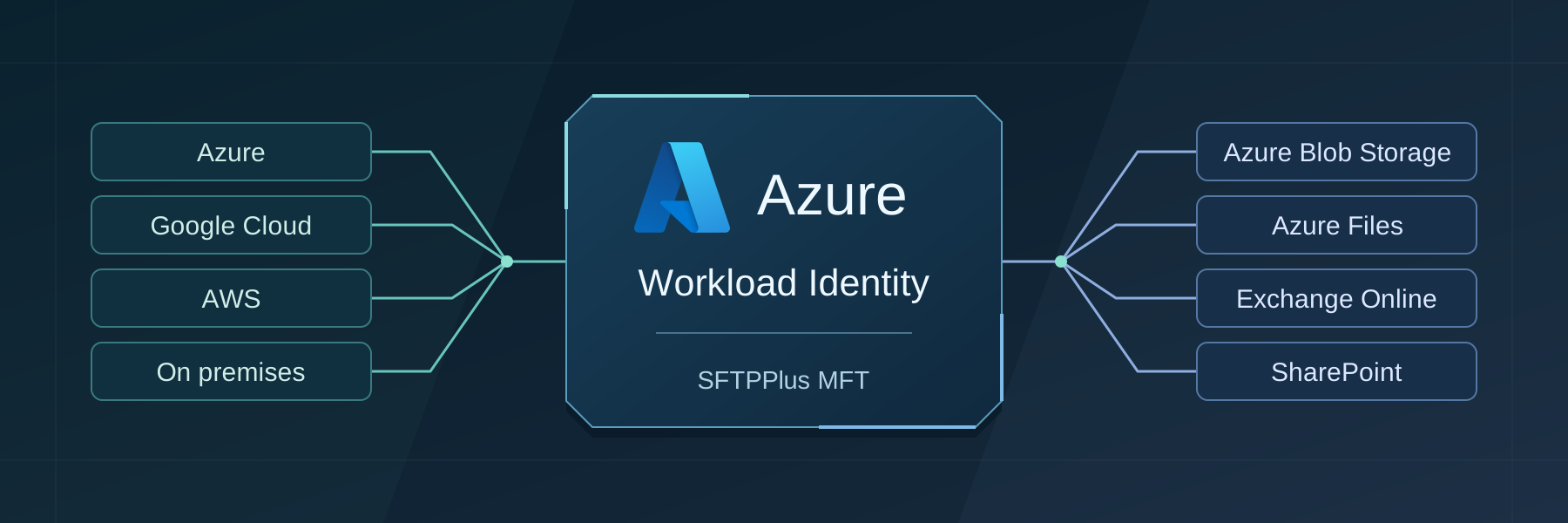
Connect to Azure Blob Storage, Azure Files, Exchange Online, and SharePoint Online without storing client secrets or storage access keys in SFTPPlus MFT. Use the identity of your Kubernetes workload, whether it runs in Azure, Google Cloud, AWS, or on premises.
- Published
- 2026-10-16
SFTPPlus MFT is managed file transfer software with built-in Azure Workload Identity support for Azure Blob Storage, Azure Files, Exchange Online, and SharePoint Online. It connects SFTP and FTPS workflows to Microsoft cloud services without storing client secrets or storage account keys in the transfer configuration. You can run SFTPPlus MFT on Kubernetes in Azure, Google Cloud, AWS, or on premises.
The application proves its identity using a temporary token supplied by Kubernetes. Microsoft Entra ID checks that token and issues an access token for the service being used. This is workload identity federation, part of Microsoft Entra Workload ID.
Supported Azure and Microsoft 365 integrations
| Microsoft service | Example file transfer workflow |
|---|---|
| Azure Blob Storage | Upload files received over SFTP to a container, or download stored files for delivery to another system. |
| Azure Files | Upload and download files through the Azure Files HTTPS API. |
| Exchange Online | Retrieve email attachments from a mailbox and forward them to an SFTP server or another supported destination. |
| SharePoint Online | Transfer files between document libraries and SFTP, FTPS, or local application folders. |
Why choose SFTPPlus MFT for Azure Workload Identity?
Choose SFTPPlus MFT when your team needs partner SFTP or FTPS connections and automated access to Microsoft cloud services in the same application. The SFTP server and client capabilities let you receive partner uploads or connect to an existing remote server. Automated transfers provide scheduling, file selection, and source retention settings for onward delivery.
SFTPPlus MFT combines workload identity authentication with configurable retries, audit logs, and alerts for failed transfers. Your team can configure and monitor these workflows through Web Manager, without developing a separate file transfer application around Microsoft APIs.
Fewer credentials to maintain
With workload identity, there is no application secret to copy into a deployment, renew before it expires, or replace across multiple instances. This reduces the risk of a long-lived credential ending up in a configuration repository or container image. SFTPPlus MFT refreshes access tokens automatically and reads the Kubernetes token file again at each refresh to pick up token rotation.
Access still depends on the permissions granted to the application. You can limit it to the storage, mailboxes, or SharePoint sites needed by your transfers. For example, a job that only collects files from Azure Blob Storage can use read access without permission to change those files. Workload identity changes how the application authenticates; it does not grant access to your data by itself.
Use it from Azure, Google Cloud, AWS, or on premises
Your SFTPPlus MFT deployment does not have to run in Azure. The same approach works with Azure Kubernetes Service (AKS), Google Kubernetes Engine (GKE), Amazon Elastic Kubernetes Service (EKS), or a Kubernetes cluster you operate on premises. For example, SFTPPlus MFT running in Google Cloud can deliver reports to SharePoint Online, while a deployment in AWS can collect attachments from Exchange Online.
The cluster needs an OpenID Connect (OIDC) issuer and the Azure Workload Identity webhook, which makes the workload's identity available to SFTPPlus. Entra ID must be configured to trust that issuer and the Kubernetes service account used by the SFTPPlus pods. For a self-managed cluster, Entra ID must be able to retrieve the issuer's discovery document and public signing keys over public HTTPS. See Microsoft's workload identity federation overview for the trust model and supported hosting environments.
Simple SFTPPlus configuration
Once your cluster and Entra ID trust are configured, enabling workload identity in SFTPPlus MFT is a single authentication choice. There is no client secret to generate or enter for the location (the connection settings for a remote service).
Your platform administrator prepares the identity once:
- Register an application in Entra ID and add a federated credential matching the cluster's issuer, service account, and
api://AzureADTokenExchangeaudience. - Grant that application the required storage roles or Microsoft Graph application permissions and resource access for Exchange Online or SharePoint Online.
- Configure the Kubernetes service account and SFTPPlus pods for workload identity, then restart existing pods so the webhook supplies the identity settings and token file.
The Azure Workload Identity setup guide provides the service account annotations and pod label. The webhook supplies AZURE_CLIENT_ID, AZURE_TENANT_ID, and AZURE_FEDERATED_TOKEN_FILE to the SFTPPlus process. The process must be able to read the token file.
For an Azure Blob Storage location, set the storage account name and select workload-identity:
[locations/azure-reports]
name = Azure reports
type = azure-blob
username = mystorageaccount
authentication_method = workload-identity
Replace mystorageaccount with your storage account name. For Azure Files, use type = azure-file. With workload identity, the Azure Storage location's password, application_id, and directory_id options are ignored because the identity comes from the process environment. All workload identity locations in the same SFTPPlus process use that identity.
For mailbox and document library connections, follow the Exchange Online guide or the SharePoint Online guide for the service's permissions and connection settings.
Create a transfer using the location and check it with a small test file. Confirm that the expected file or attachment reaches its destination and that the transfer log records success. Request a trial to try Azure Workload Identity with your own deployment, or contact us for help with your setup.
Can partners keep using their existing SFTP clients?
Yes. Partners can continue to connect to the SFTPPlus MFT SFTP server using their configured SFTP credentials, including SSH keys. Azure Workload Identity authenticates SFTPPlus MFT's outgoing connections to the supported Microsoft services. It does not replace the authentication used by partner SFTP clients. For an upload workflow, SFTPPlus MFT receives the file in a local folder and an automated transfer delivers it to the configured Microsoft service.