

Source IP filtering#
The source_ip_filter option controls access according to the source IP address of a connection. It is available for accounts, groups, administrators, roles, security policies, and cluster pools. The rule syntax is shared, but the effect of a matching rule and the behavior when no rule matches depend on where the filter is configured.
Source IP filtering supplements authentication and firewall rules. An SFTPPlus deny rule is not a firewall rule. Network connections can remain open, but SFTPPlus rejects authentication and operations that would access protected resources for a source blocked by the security policy. Use a firewall when you need to prevent network connections from reaching SFTPPlus. An allowed source IP still needs valid credentials and the required permissions. SFTPPlus evaluates the source address it receives; if a proxy or load balancer replaces the client's address, the filter sees that replacement address unless client address forwarding is configured. See the security policy documentation for proxy considerations.
Rule syntax and evaluation order#
In the configuration file, define one rule per line using ACTION TARGET:
source_ip_filter =
    deny 192.0.2.10
    allow 192.0.2.0/24
    allow 2001:db8::/32
The action is allow or deny. Rules are evaluated from top to bottom, and the first matching rule determines the result for that filter. Later rules in the same filter are ignored once a match is found. In this example, 192.0.2.10 is denied even though it also belongs to the range allowed by the second rule.
Targets can be a single IPv4 or IPv6 address, a network in CIDR notation, a two-letter country code, or an autonomous system number prefixed with ASN. Country codes and ASN targets are case insensitive in the configuration file. Hostnames and fully qualified domain names are not supported. IPv4 rules match IPv4 addresses and IPv6 rules match IPv6 addresses. Use 0.0.0.0/0 to match every IPv4 address and ::/0 to match every IPv6 address. A rule for one address family does not cover the other.
The Web Manager provides Country and ASN number value kinds for these targets. A country is stored as an uppercase ISO 3166-1 alpha-2 code, for example AL for Albania. An autonomous system number is stored with the ASN prefix, for example ASN15169. These targets identify the country or autonomous system associated with the source address, rather than the user's nationality or location. Country and ASN matching use the configured GeoIP database. The database must contain the selected country code or ASN.
Defaults and unmatched addresses#
Configuration |
Empty filter |
Nonempty filter with no matching rule |
|---|---|---|
Account |
No direct source IP restriction; associated group filters still apply. |
Authentication is denied. |
Group |
The group is eligible for association from any source IP. |
The group is excluded from the login. |
Administrator |
No direct source IP restriction; associated role filters still apply. |
Authentication is denied. |
Role |
The role is eligible for association from any source IP. |
The role is excluded from the login. |
Security policy |
All other security policy checks apply. |
All other security policy checks continue. |
Cluster pool |
Nodes can connect from any source IP, subject to authentication. |
The node is denied access to the pool. |
A nonempty account, group, administrator, role, or pool filter has an implicit final denial. For example, a filter containing only deny 192.0.2.10 also rejects every other address because no address has an explicit allow rule. To deny one address and allow all others, add allow rules for both address families after the denial:
source_ip_filter =
    deny 192.0.2.10
    allow 0.0.0.0/0
    allow ::/0
Security policies have different defaults: a policy containing only deny 192.0.2.10 rejects that address and continues normal security checks for other addresses. See Security Policies for the effects of matching rules and examples. See cluster pool configuration for pool behavior and an example.
Accounts and groups#
An account's own filter is checked before group association. A matching deny rule, or a nonempty account filter without a matching rule, rejects authentication regardless of the group filters. An empty account filter imposes no direct source IP restriction. This is referred to as inheriting source IP access from the associated groups.
After the account passes its own filter, each associated group's filter is evaluated independently. An empty group filter or a matching allow rule keeps the group associated with the login. A matching deny rule or an unmatched nonempty filter removes that group from the login. If no groups remain, authentication is rejected, even when the account's own filter explicitly allows the address.
A denial in one group does not override an allowance in another group. The authenticated account receives access from the groups that remain associated. Group rules are not concatenated into a single ordered list. These rules also apply to groups assigned by an external authentication method.
Warning
Design conditional group and role membership so that each group or role adds permissions. Do not rely on a group or role to remove permissions granted elsewhere: its restrictions will not apply when source IP filtering excludes it from the login.
Restrict one account#
This account can authenticate only from 192.0.2.23 or 2001:db8::23. Its group has an empty filter, so the group remains associated from either permitted address:
[accounts/sales-user]
name = john-d
enabled = yes
type = application
group = sales-team
source_ip_filter =
    allow 192.0.2.23
    allow 2001:db8::23

[groups/sales-team]
name = Sales team
enabled = yes
source_ip_filter =
These examples show source IP configuration alongside the identity settings needed to explain group association. Keep the account's credentials and the group's permissions configured as required for your installation.
Select groups according to the source address#
An account can belong to different groups depending on its source IP:
[accounts/support-user]
name = support-user
enabled = yes
type = application
group = office-team, remote-team
source_ip_filter =

[groups/office-team]
name = Office team
enabled = yes
source_ip_filter =
    allow 192.0.2.0/24
    allow 198.51.100.0/24

[groups/remote-team]
name = Remote team
enabled = yes
source_ip_filter =
    allow 198.51.100.0/24
A login from 192.0.2.23 receives the office group's access. A login from 198.51.100.23 receives both groups' access. A login from any other address fails because neither group remains associated. If either group has an empty filter, that group remains eligible from every address.
To restrict this account further, give it its own filter while keeping the group filters above:
source_ip_filter =
    allow 192.0.2.23
    allow 198.51.100.23
The account can now authenticate only from these two addresses. The group filters still determine which group's access is granted at each address. Adding allow 203.0.113.23 to the account alone would not permit a login from that address because neither group allows it.
Administrators and roles#
Administrators use the same evaluation rules as accounts, with roles taking the place of groups. The administrator's direct filter must be empty or allow the source address, and at least one associated role must remain after role filtering. An empty administrator filter leaves source IP access to its associated roles. Each role's filter acts as an activation rule for that administrator's login. A matching allow rule activates the role, while a matching deny rule or no match in a nonempty filter leaves the administrator unassociated with it. An empty role filter activates the role from any source IP.
For example, restrict an administrator to one address through a role:
[administrators/office-admin]
name = office-admin
enabled = yes
type = application
roles = office-role
source_ip_filter =

[roles/office-role]
name = Office administration
enabled = yes
source_ip_filter =
    allow 192.0.2.23
Keep the administrator's credentials and the role's permissions configured separately. With multiple roles, only active roles contribute permissions to the login. A denial in one role does not cancel an allowance in another role. See administrator configuration and role configuration for the other options.
An administrator can allow one address from a VPN while denying the rest of that network. The final two rules allow all other IPv4 and IPv6 addresses:
[administrators/vpn-admin]
name = vpn-admin
enabled = yes
type = application
source_ip_filter =
    allow 10.3.4.1
    deny 10.3.4.0/24
    allow 0.0.0.0/0
    allow ::/0
The first match wins: 10.3.4.1 is allowed, other addresses in 10.3.4.0/24 are denied, and addresses outside that network are allowed by the last two rules. The administrator still needs an associated role that allows the source address.
Editing rules in the Web Manager#
Accounts, groups, administrators, roles, security policies, and cluster pools have a source IP rule table in their configuration pages. The table lists rules in evaluation order. Select Allow or Deny, select the value kind, enter or select the value, and select Add. The value is validated before the rule is appended. For security policies, the allow action is displayed as skip to indicate that matching addresses bypass the policy's IP ban and username denial checks. The deny action keeps its name and rejects authentication and access to resources for matching source addresses. The configuration file stores these actions as allow and deny.
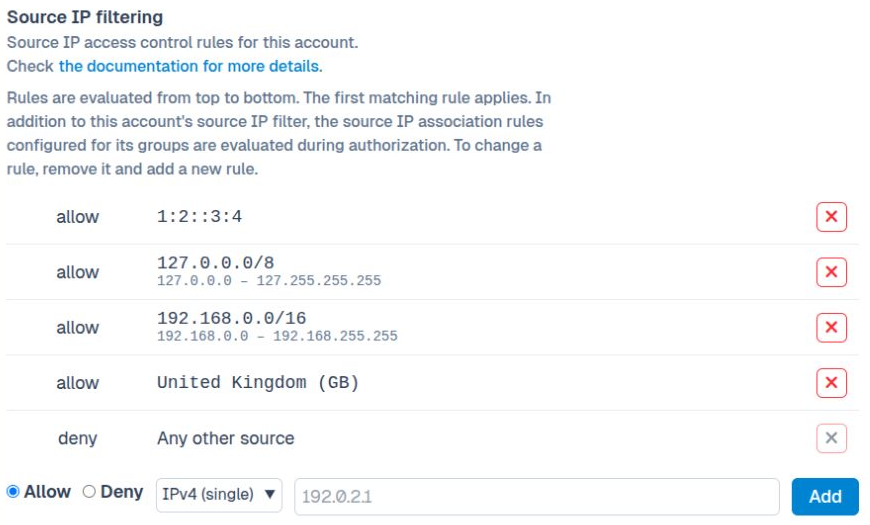
Account source IP filtering in the Web Manager.#
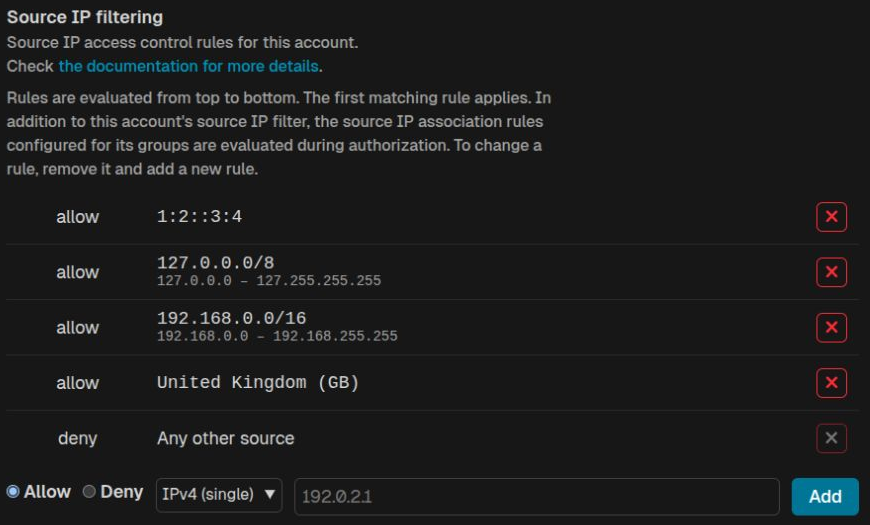
Account source IP filtering in the Web Manager.#
For Country, choose a name and code such as Albania (AL). The table also displays the country name and code, while only the code, AL, is stored in the rule. For ASN number, enter a number such as 15169 or ASN15169; the stored value is ASN15169.
Note
New IPv4 and IPv6 CIDR values are automatically normalized when you select Add in the Web Manager. The address is converted to the network address while keeping the prefix length. For example, 10.1.2.3/24 becomes 10.1.2.0/24, and 2001:db8::1234/64 becomes 2001:db8::/64.
Apply changes using the configuration review process. When a node-specific configuration override controls the filter, its rule editor is read-only.