

Entra ID / Azure AD
With native support for Entra ID SSO, you can integrate users and administrators with SFTPPlus HTTP-based services.

- Updated
- 2026-10-15
Integrating Entra ID SSO with SFTPPlus MFT
SFTPPlus MFT (Managed File Transfer) offers native support for Entra ID (formerly Azure Active Directory) SSO (Single Sign-On), enabling organizations to leverage their existing identity management systems for file transfer operations. This integration streamlines user authentication, enhances security, and simplifies user administration by centralizing control within a single system.
Authentication with Entra ID
The authentication process in SFTPPlus MFT for Entra ID users is based on OpenID Connect and OAuth 2.0, modern standards for identity and delegated authentication. When an Entra ID user attempts to access an SFTPPlus service, they're redirected to the Microsoft identity platform to authenticate. This process ensures that SFTPPlus never has direct access to user credentials.
The integration supports authentication for multiple services, including:
- HTTPS file transfers: Users can securely transfer files via the web interface using their Entra ID credentials.
- Administration: Entra ID users can be granted administrative permissions to manage the SFTPPlus MFT server, providing a consistent authentication experience for both end-users and administrators.
Control access with Entra ID groups
SFTPPlus can use Entra ID group membership to decide which users and administrators are allowed access, and what level of access is granted. For Web Manager, administrators can be admitted based on specific cloud groups and associated with SFTPPlus roles that have the same names. This allows administrative permissions to follow the groups maintained by the identity team in Entra ID.
For file transfer users, SFTPPlus groups can be associated with Entra ID groups by name or by the Entra ID group object ID. Using the object ID keeps the association valid if an Entra ID group is renamed. SFTPPlus checks both direct membership and transitive membership, so access can also be granted through a nested group.
The Entra ID configuration documentation describes group and role association in detail.
Key Benefits of Integration
Integrating Entra ID SSO with SFTPPlus MFT provides several advantages:
- Centralized User Management: User accounts are managed directly within Entra ID. When a user is added, removed, or updated in Entra ID, these changes are reflected in SFTPPlus, reducing administrative overhead and ensuring account consistency.
- Enhanced Security: Leveraging Entra ID for authentication allows organizations to enforce multi-factor authentication (MFA), conditional access policies, and other security measures that are already configured in their identity system.
- Simplified User Experience: Users can access SFTPPlus MFT using the same credentials they use for other Microsoft services, such as Office 365, providing a seamless and familiar login experience. This eliminates the need for users to remember separate passwords for file transfer services.
Technical Overview
You can check our documentation page dedicated to Entra ID for a detailed technical description on how to integrate SFTPPlus MFT and Entra ID.
To configure the integration, an administrator registers SFTPPlus as an application within the Entra ID tenant. This process generates the necessary client ID and secret, which are then configured within the SFTPPlus management console.
The Entra ID OAuth 2.0 workflow is initiated when a user attempts to log in.
You can configure different permissions and access levels in SFTPPlus based on Entra ID group membership.
Connect through an HTTP proxy
SFTPPlus can reach the Microsoft identity and Graph services through an HTTP CONNECT proxy. The Entra ID authentication method can use its own proxy, inherit the general proxy used for outgoing HTTP requests, or disable proxy use. HTTPS and TLS continue to protect the connection to the Microsoft services.
See the proxy connectivity solution for forward proxy and reverse proxy deployment options.
Trust certificates added by an HTTPS inspection proxy
Some organizations route Microsoft cloud connections through an HTTPS inspection proxy to enforce Microsoft Entra Tenant Restrictions v1 or v2. The proxy presents certificates signed by an organization's private certificate authority while it inspects the connection and adds the tenant restriction headers.
SFTPPlus MFT 5.26 and later can trust these certificates without replacing the Microsoft certificate authorities included with SFTPPlus. Add the proxy's root and intermediate or issuing CA certificates to a trusted certificates vault item, then select that item in the Entra ID authentication method's tls_trusted_certificates configuration.
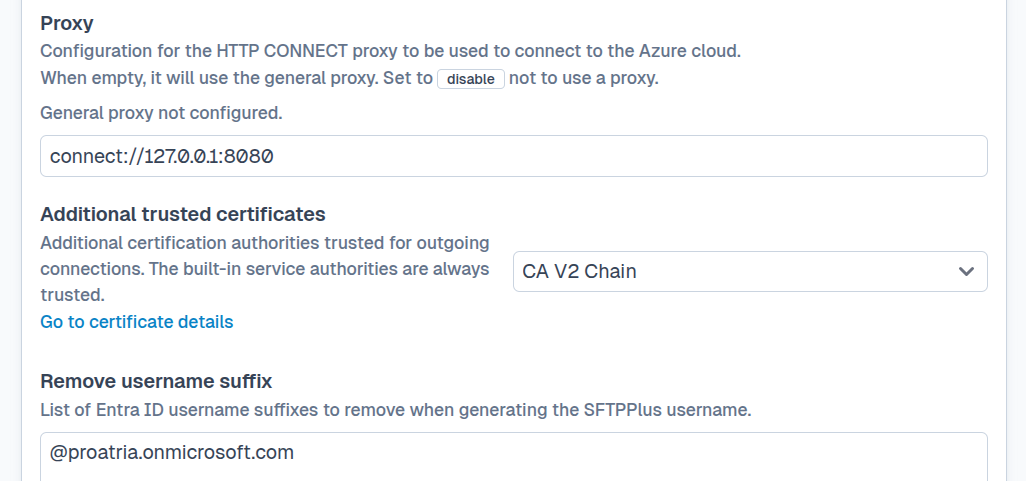
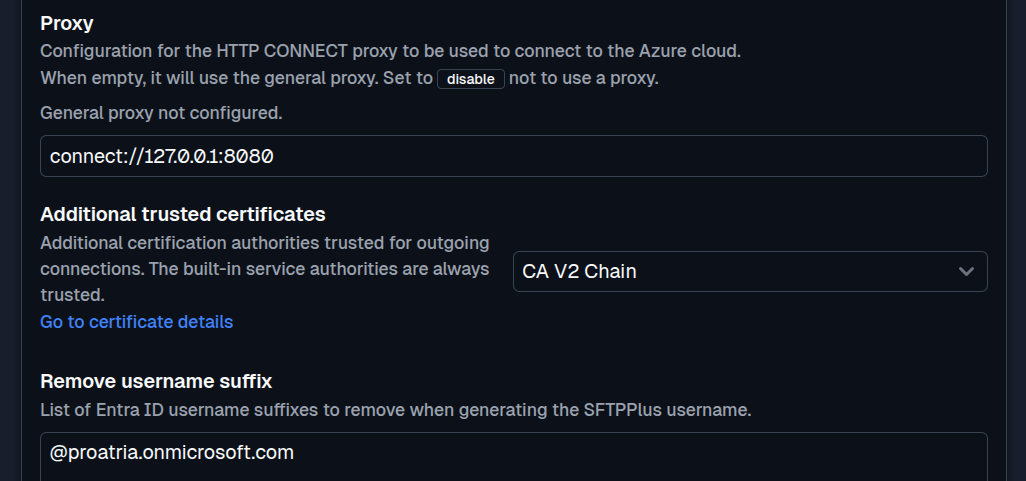
This extra trust applies to outgoing HTTPS connections from SFTPPlus to Microsoft Entra ID and Microsoft Graph. Only add certificate authorities operated or approved by your organization. Follow the tenant restrictions setup guide to configure proxy certificate trust and check sign-in.
Get support and assistance from file transfer experts
With more than two decades of experience, our support team has assisted organizations in implementing secure transfers and migrating from older systems.
Whether you're moving from legacy OS or LDAP users to stand-alone application users or to cloud SSO systems like Entra ID, our team is available to help.
Contact us to learn how we can assist with your Entra ID implementation.