4.14. SSH (SFTP and SCP) Service
This page describes the configuration options available for the SSH service, using SFTP and SCP file transfer protocols.
Both the SFTP and the SCP protocols make use of the SSH protocol for low-level encryption of transferred data. Due to this, SFTPPlus uses a generic SSH service that provides support for both SFTP and SCP. SFTP and SCP can be independently enabled.
Multiple SSH services can share the same set of RSA and DSA host keys.
4.14.1. Configuring SSH key-based authentication on the server
An account can have both password and ssh keys authentication methods enabled at the same time. At connection time, the SSH server and client will perform a negotiation step and the server will use only one method for authenticating the session.
Password authentication can be disabled for an account, in which case the server will force the client to use SSH keys for authentication.
An account is configured with one or many public SSH keys (a list). When the same account is used to connect from multiple machines, you will want to generate one pair of SSH keys for each machine, so that a private key never leaves the machine on which it is used.
For each account there is an associated local file containing on each line the public SSH keys in OpenSSH public key format accepted during the authentication.
To add a public key, you will have to copy the content of the public key from the file usually named KEY_NAME.pub and paste it on a new line into the file containing the list of allowed SSH keys.
Note
There is no restriction to having an 1:1 relation between an account and the list of public SSH keys. The same list (i.e. same local file) can be associated with multiple accounts.
There are two main approaches for configuring SSH keys for an account:
- Only the server’s administrators can manage the list of allowed SSH keys. In this case the file containing allowed SSH keys is stored somewhere outside the account’s home folder.
- Allow an account to have access to its own list of allowed SSH keys. Server administrators can still manage the list. The file with the list of allowed public SSH keys is stored inside the account’s home folder. This is similar to OpenSSH configuration, where the list is stored in .ssh/authorized_keys file.
4.14.1.1. Local Manager GUI configuration
Configuring the list of authorized SSH keys for an Account:
- Create a local file where public SSH keys associated with this account are stored. In our example, the file is located at c:\Users\sftp_access\John_keys
- Go to the account’s configuration page and enter the path in the Allowed SSH Keys Path field.
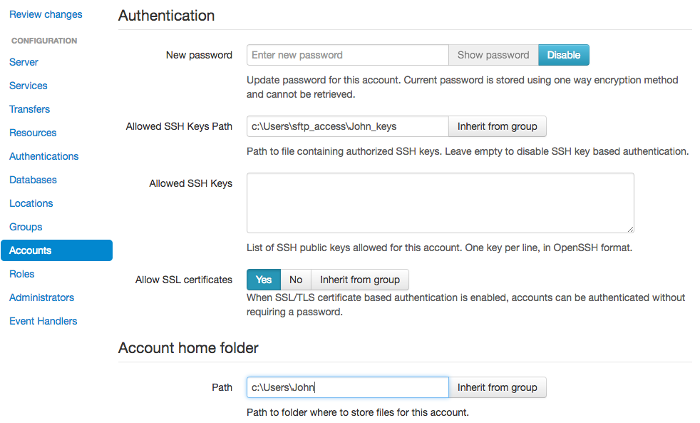
For the above configuration, the account’s home folder is in c:\Users\John and it has no access to manage its own SSH keys.
Configuring the list of authorized SSH keys for a Group:
Note that the path must contain the ${USER} value as a placeholder linking to the user name.
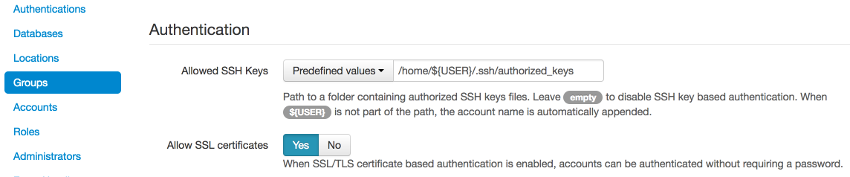
In the example above, the file path included ${USER}. The text file equivalent:
ssh_authorized_keys_path = ${USER}/authorized_keys
In the above examples, the server will read the authorized SSH keys file located at /path_to/john/authorized_keys for ${USER} john.
If the path does not include the ${USER} value, it is appended at the end.
Therefore, a file path of /authorized_keys is read as /path_to/authorized_keys/john for ${USER} john.
Note
If the file path is not set correctly, the server will fail to read the authorized SSH keys file and issue a No such file or directory error.
4.14.1.2. Text file configuration
The ssh_authorized_keys_path option from the configuration file specifies the path to the file containing the list of allowed SSH RSA/DSA public keys for each user.
In text file configuration, the path can contain the ‘${USER}’ value:
ssh_authorized_keys_path = /home/${USER}/.ssh/authorized_keys
When john is authenticated, the server will seek out the authorized SSH keys file /home/john/.ssh/authorized_keys/.
To disable SSH key-based authentication, set this value to “Disabled”, as in the example below:
ssh_authorized_keys_path = Disabled
4.14.2. sftp
| Optional: | Yes |
|---|---|
| Default value: | Yes |
| Values: |
|
| From version: | 2.5.0 |
| To version: | None |
| Description: | Enable/Disable support for the SFTP protocol. |
4.14.3. scp
| Optional: | Yes |
|---|---|
| Default value: | No |
| Values: |
|
| From version: | 2.5.0 |
| To version: | None |
| Description: | Enable/Disable support for the SCP protocol. |
4.14.4. rsa_public_key
| Optional: | Yes |
|---|---|
| Default value: | configuration/sftp-service-rsa-public.key |
| Values: |
|
| From version: | 1.6.0 |
| To version: | None |
| Description: | The public key can be stored in various formats, but it is recommended to store it in the OpenSSH public key format. |
4.14.5. rsa_private_key
| Optional: | Yes |
|---|---|
| Default value: | configuration/sftp-service-rsa-private.key |
| Values: |
|
| From version: | 1.6.0 |
| To version: | None |
| Description: | The private key can be stored in various formats, but it is recommended to store it in the OpenSSH private key format. |
4.14.6. rsa_private_key_password
| Optional: | Yes |
|---|---|
| Default value: | Disabled |
| Values: |
|
| From version: | 1.7.19 |
| To version: | None |
| Description: | The password is used for decrypting the stored RSA private key, in the case that it is stored encrypted on disk. |
4.14.7. dsa_public_key
| Optional: | Yes |
|---|---|
| Default value: | configuration/sftp-service-dsa-public.key |
| Values: |
|
| From version: | 1.6.0 |
| To version: | None |
| Description: | The public key can be stored in various formats, but it is recommended to store it in the OpenSSH public key format. |
4.14.8. dsa_private_key
| Optional: | Yes |
|---|---|
| Default value: | configuration/sftp-service-dsa-private.key |
| Values: |
|
| From version: | 1.6.0 |
| To version: | None |
| Description: | The private key can be stored in various formats, but it is recommended to store it in the OpenSSH private key format. |
4.14.9. dsa_private_key_password
| Optional: | Yes |
|---|---|
| Default value: | Disabled |
| Values: |
|
| From version: | 1.7.19 |
| To version: | None |
| Description: | The password is used for decrypting the stored DSA private key, in the case that it is stored encrypted on disk. |
4.14.10. primes
| Optional: | Yes |
|---|---|
| Default value: | ‘’ |
| Values: |
|
| From version: | 1.6.0 |
| To version: | None |
| Description: | The prime numbers database is used by the Diffie Hellman Group Exchange SHA1 protocol as specified by http://tools.ietf.org/html/rfc4419. The prime numbers database is stored in a file using the OpenSSH format. The server provides a default prime numbers database file. |
4.14.11. ssh_cipher_list
| Optional: | Yes |
|---|---|
| Default value: | all |
| Values: |
|
| From version: | 3.11.0 |
| To version: | None |
| Description: | The full name for each cipher should be used. This will configure the symmetrical, asymmetrical and key exchange algorithms. The special keyword all is available for configuring all the supported algorithms. When used, all other values are ignored. A pre-defined set of FIPS 140-2 approved ciphers is available by using the special fips keyword in this configuration. When fips ciphers are enabled, any other configured cipher in the list is ignored. If an unsupported cipher is used the service will fail to start. More information about the accepted values can be found at the cryptography guide |
4.14.12. banner
| Optional: | Yes |
|---|---|
| Default value: | SFTPPlus |
| Values: |
|
| From version: | 1.6.0 |
| To version: | None |
| Description: | Message used by the service to welcome new SFTP client connections. |
4.14.13. ignore_create_permissions
| Optional: | Yes |
|---|---|
| Default value: | No |
| Values: |
|
| From version: | 1.7.13 |
| To version: | None |
| Description: | Some SFTP clients, like the OpenSSH SFTP client, will always preserve file and folder permissions even if -p option is not used in the client. To work around this problem, the server can be configured to ignore the client request to set the permissions when creating a file or folder. When permissions are ignored, the default file mode (666) is applied. Before setting the permission the configured umask value is first masked against the permissions. Note In the case in which you want to mirror the local permissions, use the SFTP client’s dedicated command for setting the permisisons. |
4.14.14. idle_connection_timeout
| Optional: | Yes |
|---|---|
| Default value: | 300 |
| Values: |
|
| From version: | 1.7.19 |
| To version: | None |
| Description: | The service will close the connection if a client connection is idle for a configurable amount of time. |
4.14.15. maximum_concurrent_connections
| Optional: | Yes |
|---|---|
| Default value: | 10000 |
| Values: |
|
| From version: | 1.7.19 |
| To version: | None |
| Description: | Maximum number of allowed concurrent connections for this service. This limit is imposed by each service, and it is not a global limit for all services active on the server. |