

Validate content in workflows
Inspect incoming text files for expected or unwanted values, then notify other systems or generate a file digest. This allows validating the file content in automated workflows.

- Updated
- 2026-07-30
A file transfer can complete successfully even when the file itself contains data that should stop the next stage of processing. A report might include an error message, a rejected status, or a negative value that requires attention.
The SFTPPlus MFT content-check event handler can inspect the file after a transfer and emit a new event when it finds configured content. This adds lightweight file validation to an automated workflow without requiring a separate script.
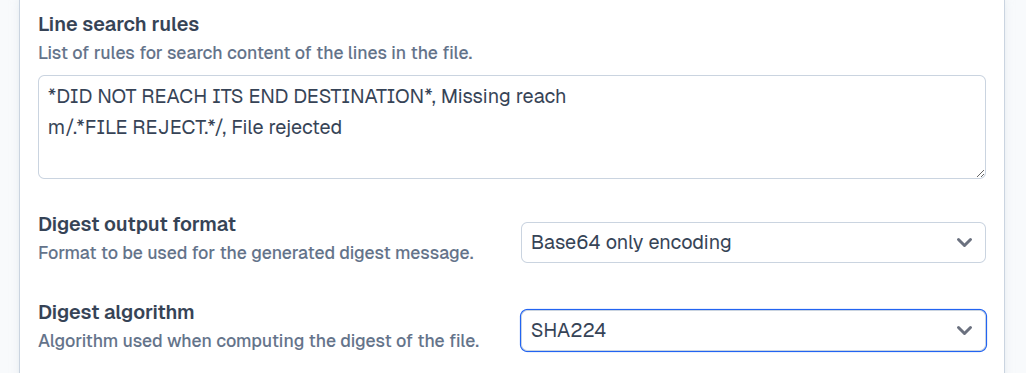
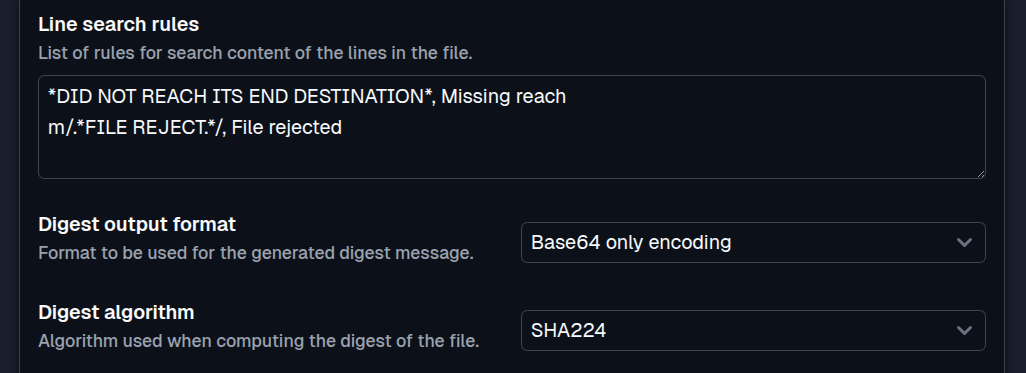
Check incoming report files
The event handler searches UTF-8 text files one line at a time. Each rule combines a matching expression with a description that identifies the result.
For example, separate rules can detect a successful completion marker, the word ERROR, or a negative value in a report. If several lines match the same rule, SFTPPlus emits the corresponding content result event once rather than creating a separate event for every matching line.
The check can be limited to events from a particular transfer, service, account, or source folder. This makes it possible to apply different validation rules to files from different partners or business processes.
Send an email when a file needs attention
Events created by a content check can be processed by other SFTPPlus event handlers. An email event handler can notify an operations team when a report contains an error message or a value that falls outside the expected range.
The workflow remains event driven:
- SFTPPlus receives or downloads the file.
- The
content-checkhandler inspects its text. - A matching rule emits an event with the configured result description.
- An email handler receives that event and sends the alert.
The same result can trigger another supported event handler when the file should be logged, dispatched to a different folder, or reported to an external service.
Make simple ETL routing decisions
A content check can extract a small decision signal from a file, such as a report type, processing status, or completion marker. Downstream handlers can then route the file or notify another system based on that signal.
This is useful for simple ETL workflows where files only need to be classified before the next step. Complex parsing or changes to the file contents should be handled by a dedicated processing service.
Generate a digest for a file
The same handler can calculate a file digest and emit it as an event. Administrators can select the digest algorithm and output format required by the receiving workflow.
Digest generation records a checksum for auditing or downstream processing. It does not compare the result with an existing checksum, so it should not be used by itself to verify a separately supplied digest.
Content searching is designed for UTF-8 text files and does not support binary or non-UTF-8 files. See the content check event handler documentation for matching rules, digest options, event IDs, and configuration examples.